 yixian
前言:
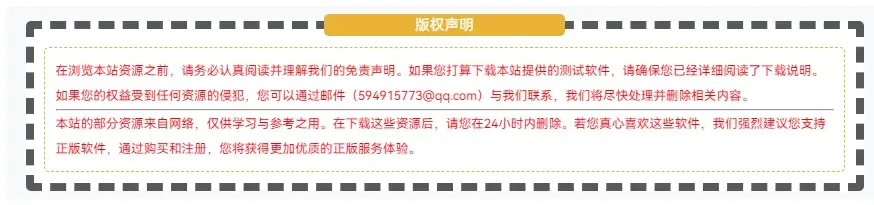
CoreNext主题支持自定义文章版权内容,我们可以在此进行美化。
代码如下:
<fieldset style="border: 8px dashed; background: #ffffff; padding: 10px; border-radius: 5px; line-height: 1.5em; color: #595959;" data-mce-style="border: 2px dashed; background: #ffffff; padding: 10px; border-radius: 5px; line-height: 1.5em; color: #595959;">
 <legend style="color: #ffffff; width: 30%; text-align: center; background-color: #e8b235; border-radius: 5px;" align="center" data-mce-style="color: #ffffff; width: 30%; text-align: center; background-color: #e8b235; border-radius: 8px;">版权声明</legend>
 <fieldset style="border: 1px dashed #e8b235; padding: 10px; border-radius: 5px; line-height: 2em; font-size: 12px; color: #FF0000; text-align: center;" data-mce-style="border: 1px dashed #e8b235; padding: 10px; border-radius: 5px; line-height: 2em; font-size: 12px; color: #FF0000; text-align: center;">
<p style="font-size: 12px; text-align: left;" data-mce-style="font-size: 12px; text-align: left;">
在此修改
</p>
<hr>
 <p style="font-size: 12px; text-align: left;" data-mce-style="font-size: 12px; text-align: left;">
在此修改
</p>
 </fieldset>
</fieldset>
实际效果:
来源参考:
好软猫:https://www.haoruanmao.com
评论 0
暂无评论,来说两句吧~